(+84) 9 61 67 55 66
info@vietanlaw.vn

How to register dependent deduction via VneID: A complete online guide

In the context of comprehensive digital transformation, the integration of taxes into VNeID has helped citizens save maximum time and effort. Instead of having to go directly to the tax authority, you can completely register dependents on VNeID yourself with just a few taps on your phone. The process and how to add dependents on VNeID 2026 are designed to be minimalist, allowing population data to automatically connect for quick profile verification. Proactively updating family circumstance deduction information on VNeID at home not only ensures accurate personal benefits but also helps optimize tax obligations in the most transparent and modern way.

Table of contents

Hide

    How to register dependent deduction via VNeID: a complete online guide

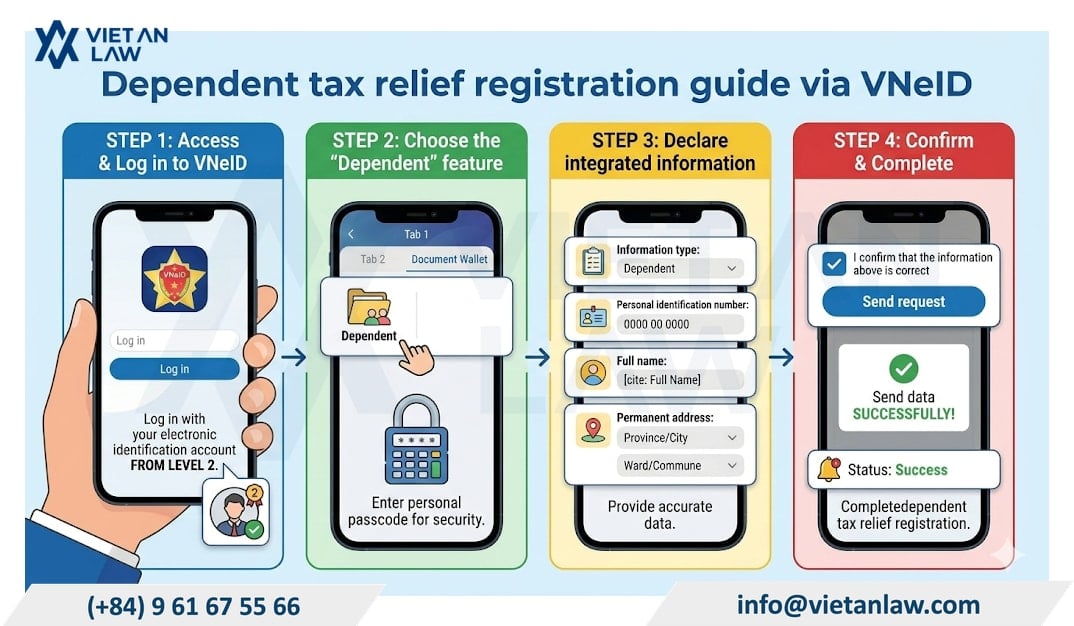
    To implement the VNeID dependent deduction right at home without going directly to the tax authority, follow these detailed step-by-step instructions:
    How to register dependent deduction via VNeID: a complete online guide

    Step 1: Access the VNeID application

    Proceed to log in to the VNeID application. Note that your account must be a level 2 electronic identity account to be able to use the tax integration feature on VNeID.

    Step 2: Access the “Dependent feature”

    On the main interface, select the “Document Wallet” section, then find and select “Dependent”. To ensure security, the system will require you to enter your personal Passcode.

    Step 3: Declare integration information

    In this section, you need to accurately provide the following data to perform the method of adding dependents on VNeID 2026: Type of information: Tick the “Dependent” box. Personal identification number: Enter the exact citizen identification/identification number of the person you want to register. Full name: Fill in the full name according to the dependent’s birth certificate. Permanent residence: Choose the correct Province/City and Ward/Commune based on the current permanent address (the system has updated according to the latest administrative model).

    Step 4: Confirm and complete

    After carefully checking the information, tick the box “I confirm the above information is correct” and click “Send request”. The system will display a notification of successful data submission.

    Finally, just monitor the notification on the application. When the status changes to “Successful”, the registration of dependents on VNeID to calculate your PIT family circumstance deduction is officially completed.

    Documents and information to prepare before registering for family circumstance deduction via VNeID

    • Personal identification number (CCCD) of the dependent
    • Accurate information about the full name and date of birth of the dependent
    • Current permanent address of the dependent (Province/City, District, Ward/Commune)
    • Personal tax code of the taxpayer (to check the integration status)
    • Passcode of the VNeID application Smartphone with internet connection and VNeID level 2 installed

    Common errors when registering for dependent deduction via VNeID

    During the process of adding dependents on VNeID 2026, users may encounter some technical problems. Here are quick solutions for common cases:

    Information does not match the national database

    • Cause: The demographic data (full name, date of birth, address) of the dependent on the tax system or old documents is inconsistent with the data on the National Population Database.
    • Solution: You need to bring the citizen identification card or birth certificate of the dependent to the Commune/Ward Police where you permanently reside to request checking, updating, and correcting the identification information accurately.

    Dependent has already been registered by someone else

    Example: The husband has registered the deduction for the child; when the wife continues to register for that same child, the system will report an error.

    • According to the provisions of Clause 3, Article 10 of the Personal Income Tax Law 2025, the principle of calculating family circumstance deductions is: “Each dependent is only calculated for deduction once for one taxpayer”.
    • The family needs to agree for only one person to register. If you want to change the direct deductor (e.g., switch from father to mother), the current registrant must complete the procedure to reduce the dependent before the other person proceeds with the new registration.

    System reports “Request is being processed” for too long

    Due to the number of users registering dependents on VNeID at the same time, local overload may occur. You should check the “Request history” section again after 24h – 48h.

    If there are still no results after 7 working days, you can contact the VNeID support switchboard or the one-stop department of the managing Tax Department to request support in checking the data flow.

    Do I need to notify Human Resources (HR) after registering for dependent deduction via VNEID?

    Even though you have successfully registered the dependent on VNeID, this only resolves the “data” part between the taxpayer and the Tax authority. To ensure the monthly PIT amount is directly deducted on your payroll, notifying the company’s HR is necessary to:

    • Update the payroll software: HR cannot automatically access your personal VNeID account to know who you have added. They need the information to enter into the company’s payroll system.
    • Year-end tax finalization: The company is the entity that pays income and performs tax finalization on your behalf. If HR does not have dependent information, they cannot apply the deduction during finalization.

    New regulations to note regarding PIT dependent deductions

    Latest family circumstance deduction levels from January 1, 2026

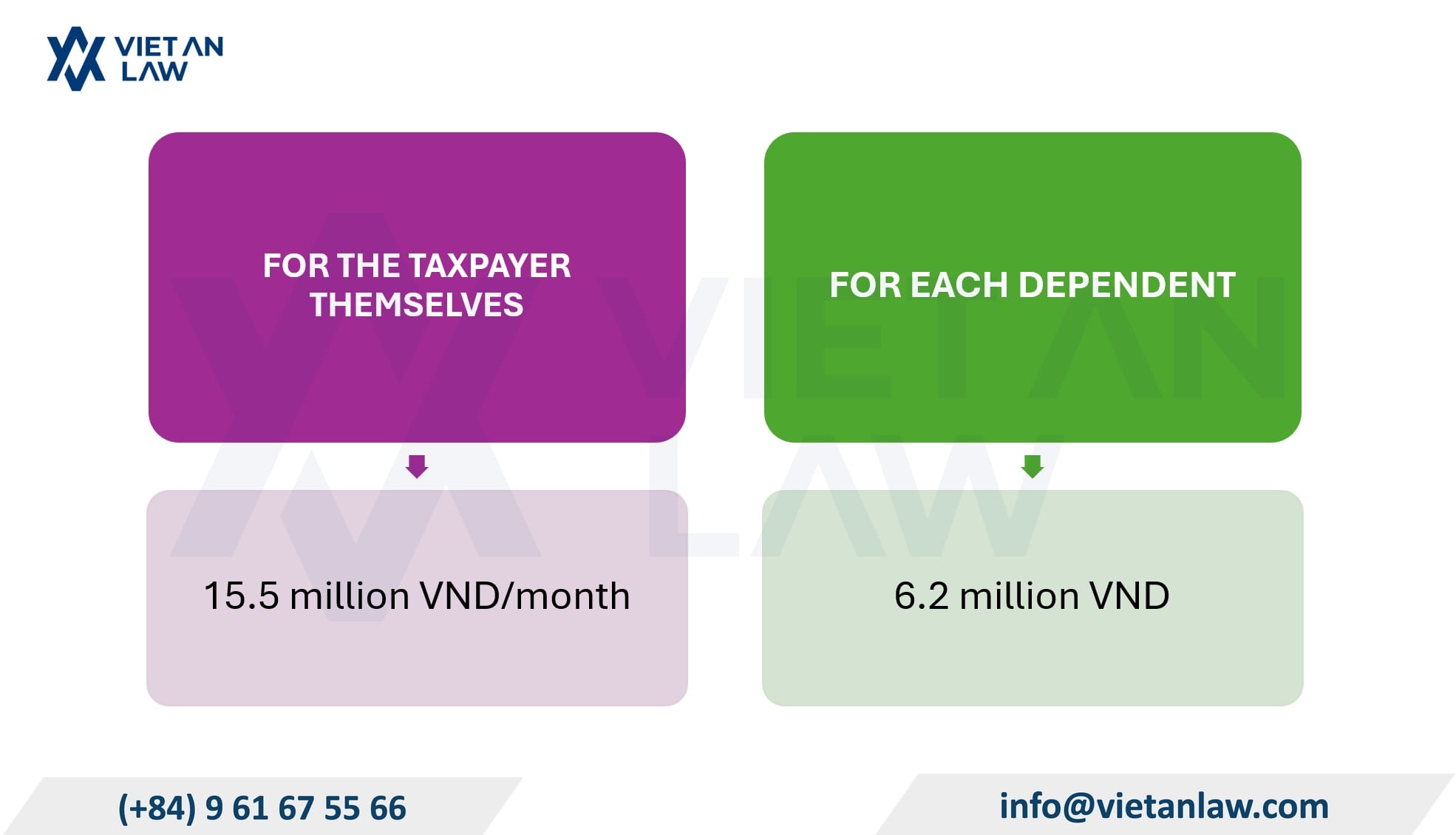
    According to the new regulations of Resolution 110/2025/UBTVQH15 taking effect from January 1, 2026, the deduction levels when calculating PIT are as follows:
    Latest family circumstance deduction levels from January 1, 2026

    • For the taxpayer themselves: The family circumstance deduction increases from 11 million VND/month to 15.5 million VND/month (equivalent to an increase from 132 million VND/year to 186 million VND/year).
    • For each dependent: Increases from 4.4 million VND/month/each dependent to 6.2 million VND/month/each dependent.

    Subjects defined as dependents

    Dependents of the taxpayer to be calculated for family circumstance deduction include the subjects according to Clause 4, Article 10 of the Personal Income Tax Law 2025:

    Children:

    • Minor children (under 18 years old).
    • Children who are disabled, have lost civil act capacity, or are incapable of working.
    • Adult children who are currently studying at Universities, Colleges, Professional Secondary Schools, or vocational schools.

    Group of relatives with low income or unable to work: (Applicable to individuals with no income or income not exceeding the level prescribed by the Ministry of Finance)

    • Wife or husband incapable of working.
    • Biological father, biological mother; father-in-law, mother-in-law (or wife’s father, wife’s mother) who are past working age or incapable of working.

    Other groups of subjects: Individuals without support whom the taxpayer is directly responsible for nurturing according to the provisions of law.

    Sole principle when registering dependents

    The determination of the family circumstance deduction level for dependents is implemented according to the principle that each dependent is only calculated for deduction once for one taxpayer.

    Flexible adjustment mechanism for family circumstance deduction levels

    The Personal Income Tax Law 2025 also stipulates that the deduction level is not fixed forever. The Government will base on price fluctuations (inflation) and the socio-economic situation to submit to the National Assembly Standing Committee to adjust the deduction levels (15.5 million and 6.2 million) to suit the actual living costs of the people.

    Above is the advice on How to register dependent deduction via VNeID: A complete online guide. If customers have related questions or need tax advice, please contact the Tax Agent – Viet An Law Firm for the best advice and support!


    Fast & Reliable Legal Assistance
    Fill out the form below and get connected with a lawyer quickly.

      Related Acticle

      Immigration consulting company establishment business lines in Vietnam

      Immigration consulting company establishment business lines in Vietnam

      Immigration consulting company establishment business lines in Vietnam explained. Complete guide to required licenses, registration procedures, and legal business codes for 2025.
      Environmental company establishment business lines in Vietnam

      Environmental company establishment business lines in Vietnam

      Environmental company establishment business lines in Vietnam 2025. Complete guide to waste management, wastewater treatment, and environmental services registration procedures.
      E-commerce business registration business lines in Vietnam

      E-commerce business registration business lines in Vietnam

      E-commerce business registration business lines in Vietnam explained. Complete guide covering legal requirements, business line codes, conditions, and procedures for 2025.
      Employment service business registration business lines in Vietnam

      Employment service business registration business lines in Vietnam

      Employment service business registration business lines in Vietnam explained. Complete guide covering conditions, license requirements, and registration procedures for 2025.
      Latest Updates on Tax Administration for Associated Transactions in Vietnam

      Latest Updates on Tax Administration for Associated Transactions in Vietnam

      Latest Updates on Tax Administration for Associated Transactions in Vietnam 2026. Complete guide covering transfer pricing, CbCR requirements, and compliance obligations.

      CONTACT VIET AN LAW

      In Hanoi: (+84) 9 61 67 55 66
      (Zalo, Viber, Whatsapp, Wechat)

      WhatsApp Chat

      whatsapp-1

      In Hochiminh: (+84) 9 61 67 55 66
      (Zalo, Viber, Whatsapp, Wechat)

      WhatsApp Chat

      whatsapp-1

      ASSOCIATE MEMBERSHIP